

Build
Everything here was done on the reference rig in this order, and nothing needs a keyboard plugged into the Pi. Have the parts list to hand; the wire numbers below match the diagrams.
1. Write the card
Section titled “1. Write the card”- Download
skylapse.img.xzfrom the latest release. - Open Raspberry Pi Imager and pick your device, Raspberry Pi 5 or whichever you have.
- Under Choose OS, scroll to the bottom, pick Use custom, and select the file you downloaded.
- Choose storage, your microSD card, and Write.
Imager will not offer its customisation screen for a custom image, so there is nowhere to enter Wi-Fi. That’s expected: the camera asks for your Wi-Fi itself on first boot, from your phone. Leave the card in the Pi and do the wiring before powering up.
2. Wire the power
Section titled “2. Wire the power”One 12V supply feeds everything. Every conductor in the build is numbered in this diagram. Dots are joins; lines crossing without a dot are not connected. Click it for full size.
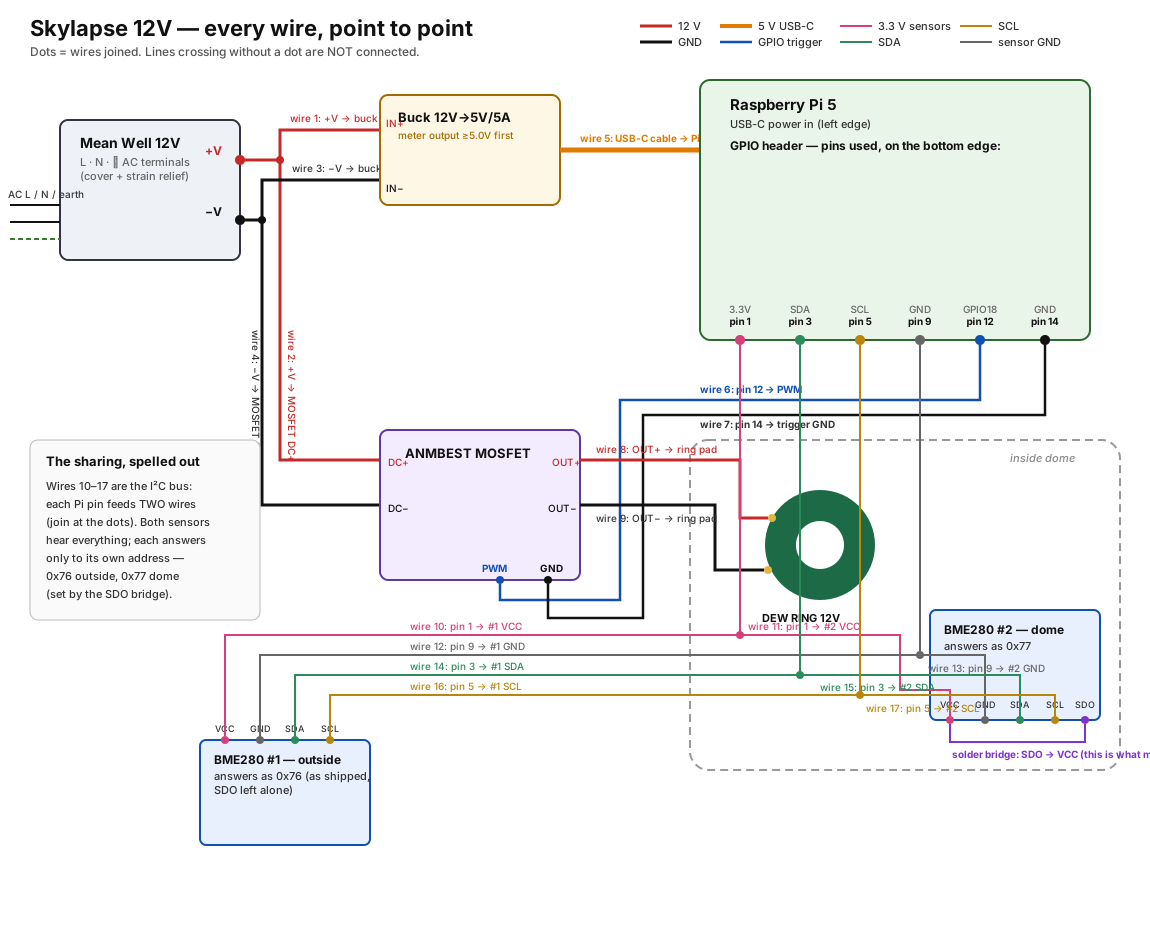
- Wires 1 and 3: Mean Well +V and −V to the buck converter’s input. These carry the Pi’s current, up to about 2.5 A at 12V, so use 18 or 20 AWG.
- Wire 5: the buck’s USB-C lead into the Pi’s power socket.
- Wires 2 and 4: Mean Well +V and −V to the MOSFET module’s input. Heater current only, 24 AWG is fine.
Before the Pi ever sees it, meter the buck’s output. It must read above 5.0 V. The Pi 5 latches off below 4.75 V, and a buck that reads 4.9 V will produce a camera that dies mid-night with a red LED.
3. Wire the heater switch
Section titled “3. Wire the heater switch”The MOSFET module’s terminal labels are printed on its back, so here are the six heater wires landed on a photo of the front. Top screw block is the 12V input, bottom block is the switched output to the ring. The outer screw of each block is +, the inner screw is −. The J1 header’s two big holes are GND (upper) and TRIG/PWM (lower).
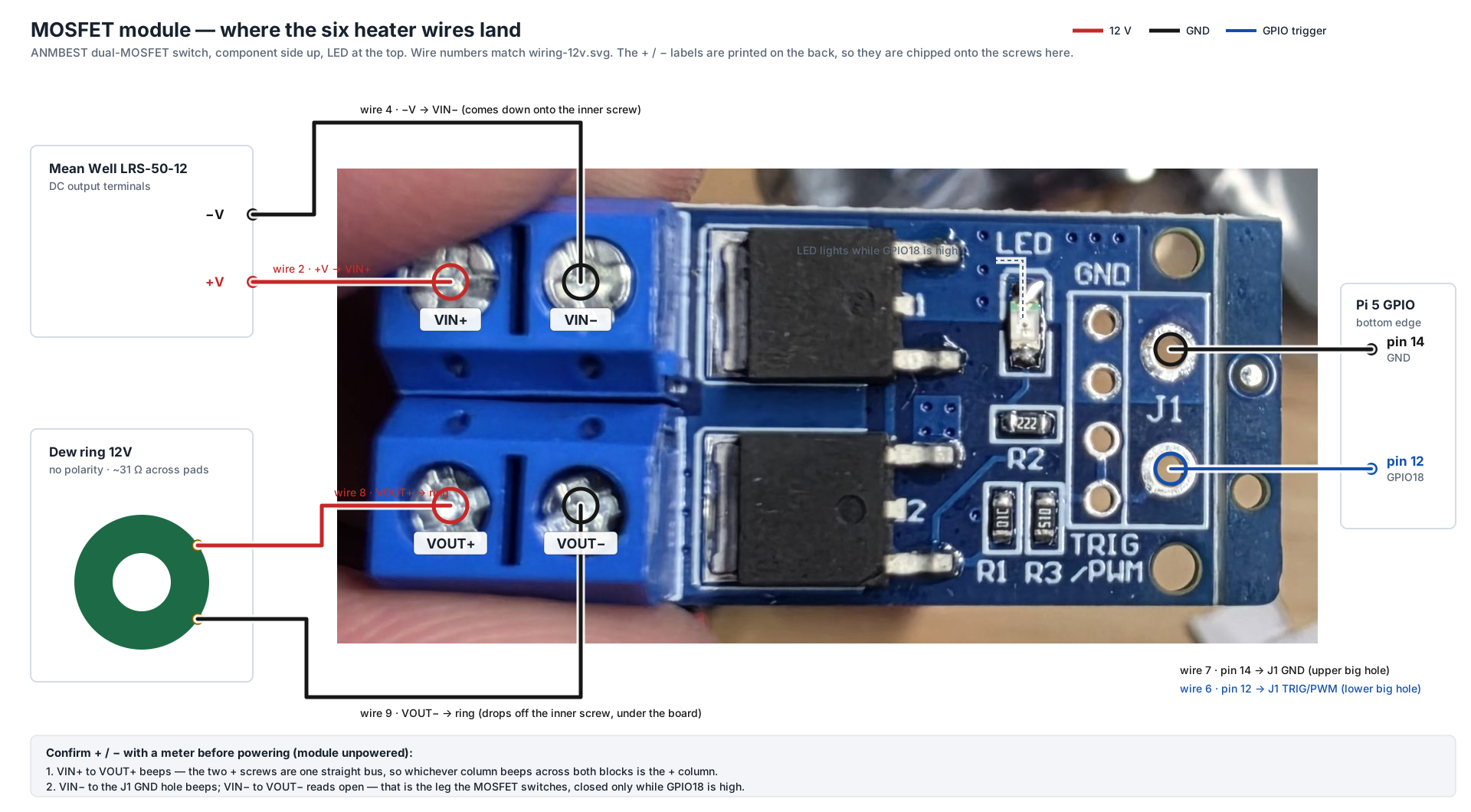
| Wire | From | To on the module |
|---|---|---|
| 2 | Mean Well +V | VIN+, top block, outer screw |
| 4 | Mean Well −V | VIN−, top block, inner screw |
| 8 | ring pad | VOUT+, bottom block, outer screw |
| 9 | ring pad | VOUT−, bottom block, inner screw |
| 6 | Pi pin 12, GPIO 18 | J1 TRIG/PWM, lower big hole |
| 7 | Pi pin 14, GND | J1 GND, upper big hole |
Confirm the polarity with a meter before powering, module unpowered. VIN+ to VOUT+ is a straight bus and beeps. VIN− to the J1 GND hole beeps. VIN− to VOUT− is the leg the MOSFET switches, so it reads open. If the + column turns out to be the inner screws on your batch, swap the two wires in each block.
The ring has no polarity, so wires 8 and 9 are interchangeable. Twenty-four gauge is thin enough to slip out from under a screw, so fold the stripped end back on itself or tin it, and strain-relieve both wires near the module.
4. Wire the sensors
Section titled “4. Wire the sensors”Both BME280s share the Pi’s I²C bus: wires 10 to 17 in the diagram, four from each sensor, joined in pairs at the Pi’s pins.
| Pi pin | Signal | To |
|---|---|---|
| 1 | 3.3V | both sensors’ VCC |
| 3 | SDA | both sensors’ SDA |
| 5 | SCL | both sensors’ SCL |
| 9 | GND | both sensors’ GND |
- Sensor #1, outside, is wired as shipped and answers at address 0x76. Mount it in free air and shade, not inside the box with the supply.
- Sensor #2, in the dome, gets one solder joint: bridge its SDO pad to VCC. That makes it answer at 0x77, which is how the software knows which one is the dome. Both hear everything on the bus and each answers only to its own address.
Power the sensors from the Pi’s 3.3V pin even if your boards say 5V on them; the sensor chip itself runs at 3.3V and the Pi’s I²C pins are 3.3V only. If your boards bring SDO out as a pin rather than a pad, wire it to GND for 0x76 and to 3.3V for 0x77, and never leave it floating.
5. Fit the ring and the dome
Section titled “5. Fit the ring and the dome”The ring sits on the dome’s seat with the dome resting on it, trace side toward the dome. Stick it down with thermal transfer tape or dabs of silicone rather than foam mounting tape, which insulates and lets go under damp heat cycling. Strain-relieve wires 8 and 9 inside the enclosure so flexing never works the solder joints on the pads.
The dome sensor goes inside the dome, close to the glass but not touching the ring. The outside sensor goes through the enclosure wall into the air.
6. First boot and setup
Section titled “6. First boot and setup”Plug in the AC. The first boot expands the filesystem and takes a minute or two longer than later ones, and the Pi’s LED flickers while it does. Then the camera, knowing nothing about your Wi-Fi yet, serves its own network.
Join Skylapse-Setup from your phone’s Wi-Fi settings. It is open, no password. Then go to:
http://10.42.0.1Type it with http://, and if your phone asks whether to stay on a network with no internet, stay. Setup runs on the first visit: your Wi-Fi, the camera with a live test shot, where the camera is, what to capture, and optionally a password. A couple of minutes, and every answer can be changed later from the tabs across the top.
Once the camera has joined your Wi-Fi, Skylapse-Setup goes away and the camera answers at http://skylapse.local on your home network instead. A phone still sitting on the setup network at that moment loses it; just reconnect to your own Wi-Fi and carry on.
7. Switch the heater on
Section titled “7. Switch the heater on”Raspberry Pi OS ships the I²C bus off, so the camera cannot see the sensors yet no matter how well they are wired. On the Heater tab:
- Tap Enable I²C, then reboot once from Settings.
- When the camera is back, the Heater tab lists both readings, Outside and Dome. The log says
Dome sensor found at 0x77. On the reference rig both appeared within seconds of the reboot. - Run the heater test for 120 seconds. The LED on the MOSFET module lights, 12V appears across the ring, and the Dome reading starts climbing within a minute. On the reference rig it went from 18.9 °C to 23.6 °C while Outside stayed put.
- Leave the mode on Auto. The card tells you the exact temperatures it will switch on and off at for tonight’s dewpoint; see the Heater tab for how it decides.
If the Heater tab says no BME280 detected after the reboot, it is wiring: re-check wires 10 to 17 against the diagram, and that the boards are BME280s and not BMP280s.
8. Focus
Section titled “8. Focus”Start focus assist from the dashboard, zoom to 8×, and turn the lens ring until the sharpness number peaks. Nothing is written to the card while focusing, and it exits by itself after 15 minutes. Lock the ring.
9. Point it at the sky
Section titled “9. Point it at the sky”Close the enclosure, put it where it will live, plug in the extension cord, and leave it. Capture follows the schedule you set, the heater runs itself, and a timelapse renders every dawn. Turn on phone alerts so you hear about it if capture ever stops, and read Using the app for what each tab does.