

Using the app
Skylapse is a web app served by the camera itself. Open it on a phone, tablet or desktop at http://skylapse.local, or at http://10.42.0.1 when you are on the camera’s own Wi-Fi. It installs as a PWA if you want an icon on your home screen.
Dashboard
Section titled “Dashboard”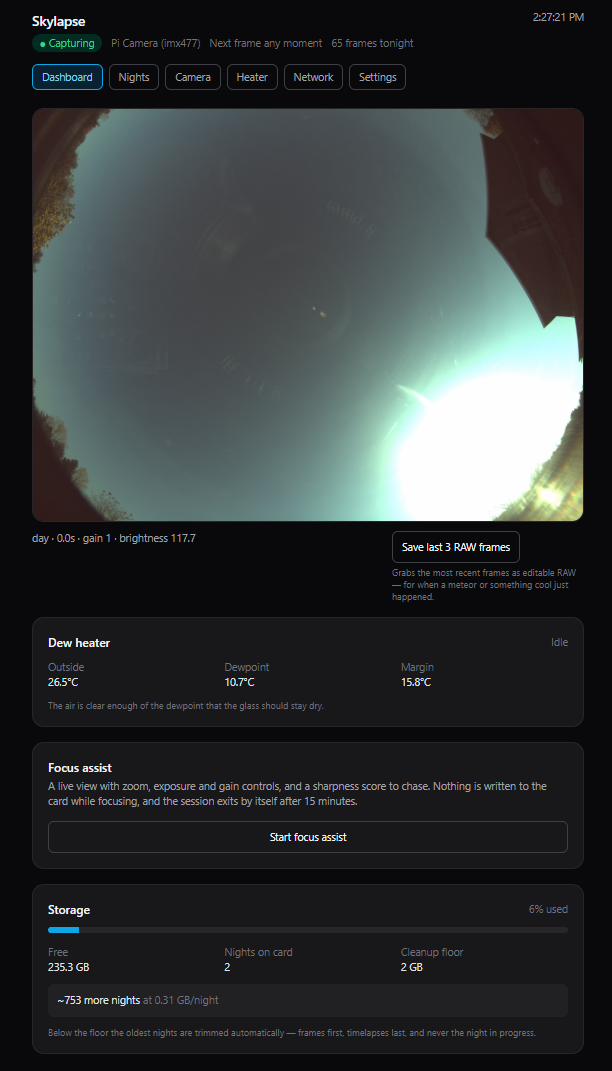
The latest frame, a status pill driven by whether frames are actually arriving rather than by what the daemon claims, a countdown to the next one, storage, the heater’s state, and the Save RAW button: the keeper for when a meteor just went past. Focus assist starts from here too.
Nights
Section titled “Nights”Every night captured, with frame counts and sizes. Open one to:
- scrub the filmstrip frame by frame to find the clear stretch
- jump between frames that have RAW files
- watch the timelapse rendered at dawn
- download any frame as JPEG or DNG
- export to USB: copy the night to a stick, with a config backup alongside it and integrity checks on the copy
Focus assist
Section titled “Focus assist”Start it from the dashboard, then zoom to 8× and turn the ring until the sharpness number peaks. The live view zooms 1×–10× into the full-resolution sensor image. Nothing is written to the card while focusing, and it exits by itself after 15 minutes.
Camera
Section titled “Camera”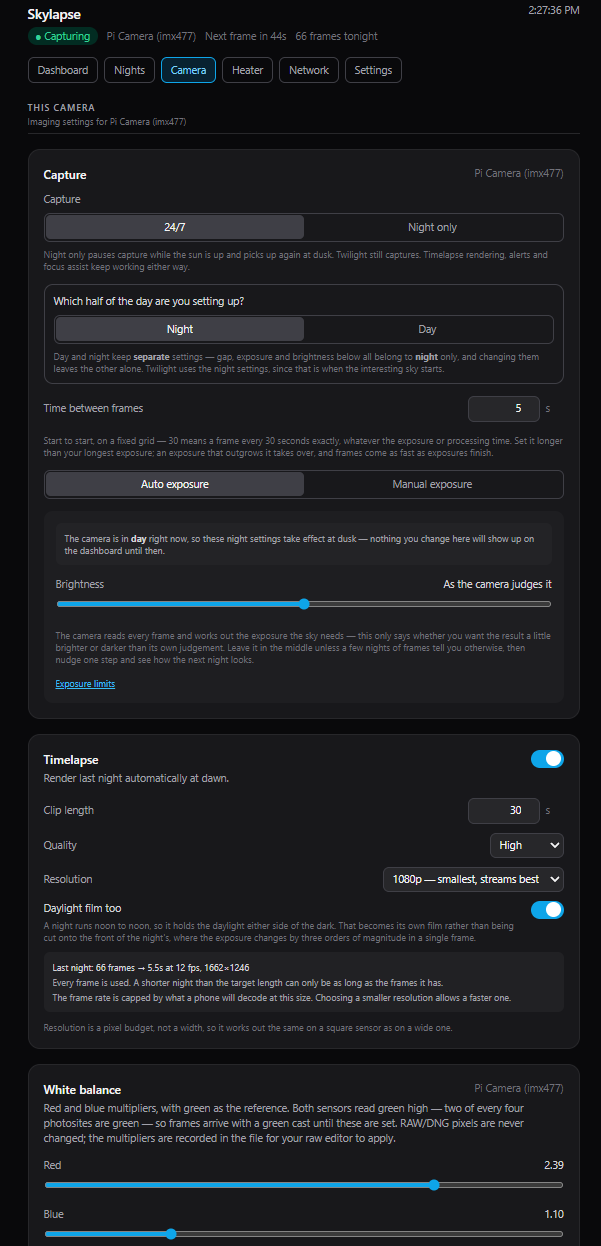
Everything about the imaging itself:
- Capture schedule: 24/7 or night-only.
- Exposure profiles: day, night and twilight, chosen from sun altitude, plus a manual mode for star-tracker rigs.
- RAW policy: off, on demand, on a schedule, or every frame. Read Storage & RAW first.
- Timelapse options: length and quality for the dawn render, with one-off overrides.
- White balance: red and blue sliders per camera with “Auto from current frame”. Both sensor families read green high, two of every four photosites being green, so set this once per camera. RAW pixels are never changed; the multipliers are recorded in the DNG for your raw editor.
- Hardware: declare a board the Pi cannot detect, add a ZWO camera, install ZWO support.
Heater
Section titled “Heater”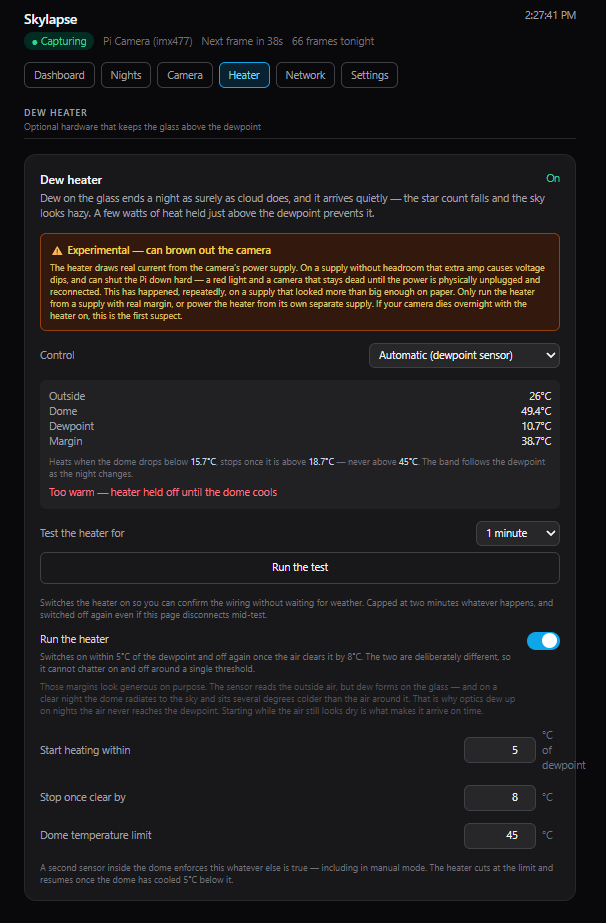
The dew heater’s own tab. The readings come from the two BME280s: Outside is the air, Dome is the glass, and the Dewpoint is computed from the outside temperature and humidity.
Auto mode holds the dome a set distance above the dewpoint. There is no fixed target temperature, because dew forms when the surface reaches the dewpoint, not at any particular number:
- The heater switches on when the dome is less than 5 °C above the dewpoint.
- It switches off once the dome is more than 8 °C above it. The 3 °C gap stops it chattering on a marginal night.
- A hard dome limit of 45 °C cuts the heater regardless, including in manual mode, and releases once the dome has cooled to 40 °C.
The card prints the actual switch-on and switch-off temperatures for tonight’s dewpoint, and they move with it through the night. Both margins and the limit are adjustable. With only one sensor fitted, the outside temperature stands in for the dome and the same rules apply.
Manual mode is a plain on/off switch that needs no sensor at all. The dome limit still applies if a dome sensor is present, since a switch left on is exactly the overheat case.
The heater is forced off whenever the capture daemon exits, so a stopped daemon can never leave it on. A timed test pulse is there for commissioning the wiring, and Enable I²C for the one-time setup step on a fresh card.
Network
Section titled “Network”Capture never depends on the network. Networking is its own service, so a Wi-Fi problem cannot take capture down with it.
- If the camera can’t reach a known network, it serves its own:
Skylapse-Setup, open by default. Join it and openhttp://10.42.0.1. When your network comes back, the camera returns to it by itself. It will not drop the access point while a phone is connected to it, and it stays up for at least five minutes regardless, so a flapping network can’t leave you chasing it. - Switch to access-point mode by hand from this tab when you are standing at the camera and don’t want to wait. That choice sticks until you switch it back, with timed options if you’d rather it return on its own.
- Remote access from anywhere, through your own free Tailscale account: one-tap install, QR-code sign-in, and a permanent
https://…ts.netaddress. The camera is never exposed to the open internet, and nothing is hosted by us. - Two cameras on one network: give the second a different hostname when you write its card, because two
skylapse.localresolve to whichever answers first.
There is no captive portal: you have to type 10.42.0.1 yourself.
Settings
Section titled “Settings”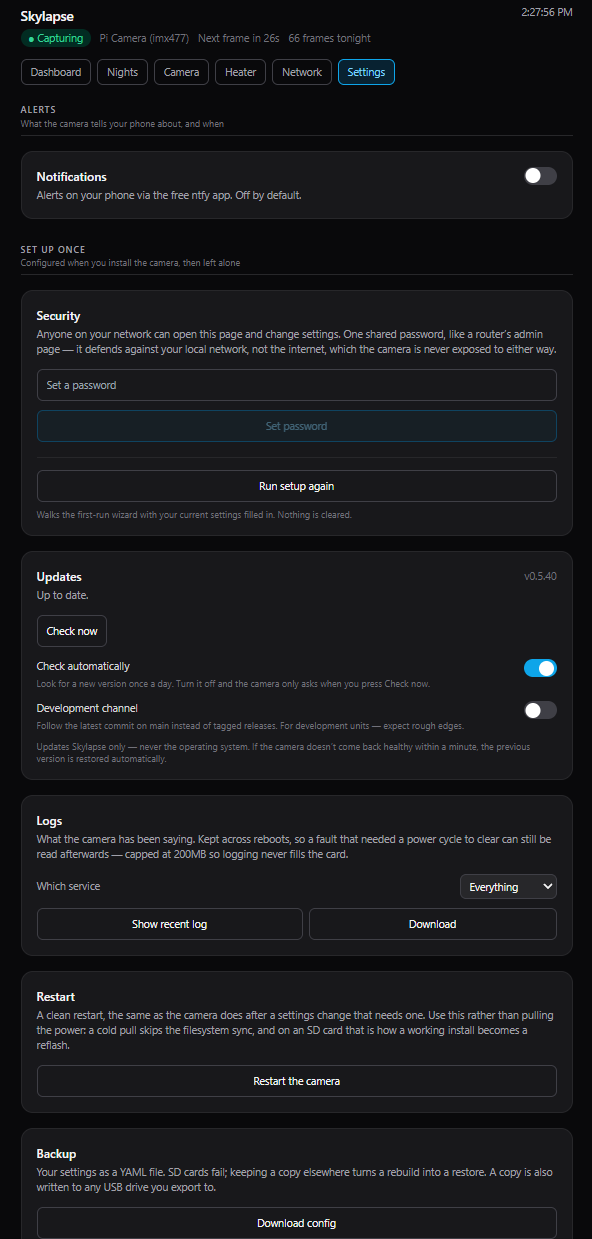
What is set once and rarely revisited: notifications, config backup, an optional password, logs readable from the page, a clean restart button, and updates.
Phone alerts
Section titled “Phone alerts”Settings → Notifications generates a private ntfy topic and shows you what to subscribe to in the free app (iOS / Android). You get told when capture stops and again when it recovers. Everything is off by default.
The watchdog notices when frames stop arriving, not merely when the process dies. A daemon that is alive but wedged, a camera that has silently disconnected, a card that has filled: all look the same to it, and all raise the alert.
The topic name is the only thing protecting it, so treat it as a secret. ntfy is a public, free push service you subscribe to directly; there is no Skylapse server in the loop.
Storage & RAW
Section titled “Storage & RAW”Every-frame RAW is expensive: measured on this 12 MP camera it is about 37 GB per night, so a 256 GB card holds about a week. The Camera tab shows your rig’s own figure before you commit, and warns about sustained write wear, because a microSD card can fail suddenly after months of that.
| You want | Use |
|---|---|
| JPEG timelapses, RAW for keepers only | Any 64 GB+ microSD. Tap Save RAW when something happens. |
| RAW on a schedule | A high-endurance microSD, 128 GB+. |
| Every-frame RAW | An external USB SSD. Endurance is the problem, not just capacity. |
Frames land one night per folder, with the day rolling over at local noon so a whole night stays together, and every frame has a JSON sidecar with its capture metadata. Skylapse deletes the oldest nights automatically when free space runs low, frames first and timelapses last, so a full card never stops capture. DNG pixels are never changed.
An external image store on a permanently attached SSD is the intended setup for every-frame RAW. It is not a guided feature yet; today the SKYLAPSE_IMAGES variable relocates the store by hand.
Updates
Section titled “Updates”Settings checks for a new release and installs it in place, in under a minute on the reference rig. If the new version does not come up healthy, Skylapse rolls back to the previous one by itself. Updates never touch the operating system: no apt, no firmware, only Skylapse’s own checkout.